Questions merchants ask. Answers that help them sell.
Starting, running and growing an ecommerce business comes with plenty of questions. Ecommerce Answers provides straightforward explanations about online stores, ecommerce platforms, marketplaces, payments, traffic, analytics, AI and the technology behind selling online.

Starting an Online Store
What are the best ecommerce platforms for small businesses in Singapore?
There is no single ecommerce platform that is best for every small business. The right choice depends on what you sell, your budget, technical experience, payment requirements, marketing strategy and how you intend to attract customers.
When comparing platforms, look beyond the monthly subscription price. Consider payment processing, transaction fees, product management, shipping options, analytics, marketing tools, integrations and the additional applications or services required to operate the store.
Most importantly, consider customer acquisition. Building an online store gives you somewhere to sell, but it does not automatically give customers a reason or a way to find you.
How do I choose the right ecommerce platform for my business?
Start with your business requirements rather than the platform's feature list.
Consider what you sell, expected order volume, payment methods, shipping requirements, product variations, customer management, analytics, marketing capabilities and whether you need additional integrations.
Then consider how the platform fits your growth strategy. Some platforms primarily provide the infrastructure for building a standalone store, while marketplaces provide access to an existing shopping audience. Other approaches can combine independent storefronts with shared product discovery.
The right platform supports how you intend to sell, operate, and acquire customers.
How do I set up an online store in Singapore?
Start by deciding what you want to sell, who you want to sell it to, and how you'll fulfil orders. Then choose an ecommerce platform, create your storefront, add products, configure payments, set up shipping and tax settings, and test the purchasing experience before launch.
The technical setup is only one part of starting an ecommerce business. You will also need a plan to attract customers through channels such as search, social media, advertising, marketplaces, content, existing customer relationships, or product-discovery platforms.
What should a small business look for in an ecommerce platform?
A small business should look for an ecommerce platform that makes everyday commerce manageable without unnecessary complexity.
Important areas include:
- Product and inventory management
Secure payment processing
Shipping and tax configuration
Mobile-friendly storefronts
Customer and order management
Analytics
Promotions and marketing
Search and product discoverability
Integrations with the tools your business uses
Clear and predictable costs
Ease of setup matters, but so does what happens after the store launches. A simple storefront is only useful if the business can attract customers and convert visits into sales.
Platforms & Marketplaces
What are the best Shopify alternatives in Singapore?
The best alternative depends on why you are looking for one.
A merchant seeking greater customisation may prioritise a different set of platforms from one looking for simpler store management, lower operating complexity, marketplace access or built-in product discovery.
Before switching, identify the problem you are actually trying to solve. Compare the total operating cost, payments, product management, analytics, marketing capabilities, integrations and how each platform helps or does not help customers discover your products.
Dash to Cart takes a different approach by combining independent merchant storefronts with a shared Discovery environment where products from participating merchants can be found.
Can I sell on marketplaces and my own online store at the same time?
Yes. An ecommerce business can operate multiple sales channels simultaneously.
For example, a merchant might maintain marketplace listings to reach marketplace shoppers while operating an independent store for direct sales and brand-building.
The important consideration is operational management. Pricing, inventory, fulfilment and promotions need to be managed carefully when products are available through multiple channels.
A multi-channel strategy can also reduce dependence on any single customer source.
Should I sell on a marketplace or build my own online store?
Both approaches have advantages.
Marketplaces can provide access to an established shopping audience and help new merchants validate demand. Independent stores give businesses greater control over branding, the storefront experience and their direct customer relationships.
The choice therefore does not have to be either/or.
Your marketplace presence can support discovery and sales while an independent store develops your brand and direct sales channel.
This hybrid approach is also reflected in merchant discussions collected in Dash to Cart's marketplace research, where sellers discuss using marketplaces for traffic and cash flow while building independent channels alongside them.
What are the advantages and disadvantages of selling on an online marketplace?
Online marketplaces can give merchants access to an existing audience of shoppers, making it easier to generate visibility and validate demand without building a customer acquisition channel entirely from scratch.
However, that convenience comes with trade-offs. Depending on the marketplace, merchants may face platform fees, advertising costs, competition from similar products, pricing pressure and less control over the customer relationship.
Merchant discussions in the Dash to Cart research reflect this trade-off: sellers value marketplaces for their built-in traffic and ability to generate early sales, while concerns include fees, competitive visibility and limited ownership of customer relationships.
For many businesses, the decision does not need to be marketplace or independent ecommerce. A marketplace can serve as a discovery and sales channel while an independent store provides another channel for building the brand and direct customer relationships.
Traffic & Conversion
How do I drive traffic to a new online store?
Launching a store does not automatically create traffic. You need channels that connect potential customers with your products.
Common sources include search engines, social media, paid advertising, content marketing, email, influencers, marketplaces, product feeds, partnerships and direct referrals.
Rather than trying every channel immediately, identify where your target customers already spend their time and test a small number of channels first.
Also measure traffic quality rather than visits alone. A smaller number of visitors who view products, add items to their carts, and purchase can be considerably more valuable than thousands of visitors who immediately leave.
How do I increase sales on my ecommerce website?
Increasing ecommerce sales usually requires improving both traffic quality and conversion.
Start by identifying whether the problem is a lack of visitors, weak product engagement, low add-to-cart activity or checkout abandonment. Then improve the weakest stage rather than simply increasing advertising spend.
Useful areas to review include product pages, pricing clarity, shipping information, payment options, mobile usability, trust signals and checkout friction.
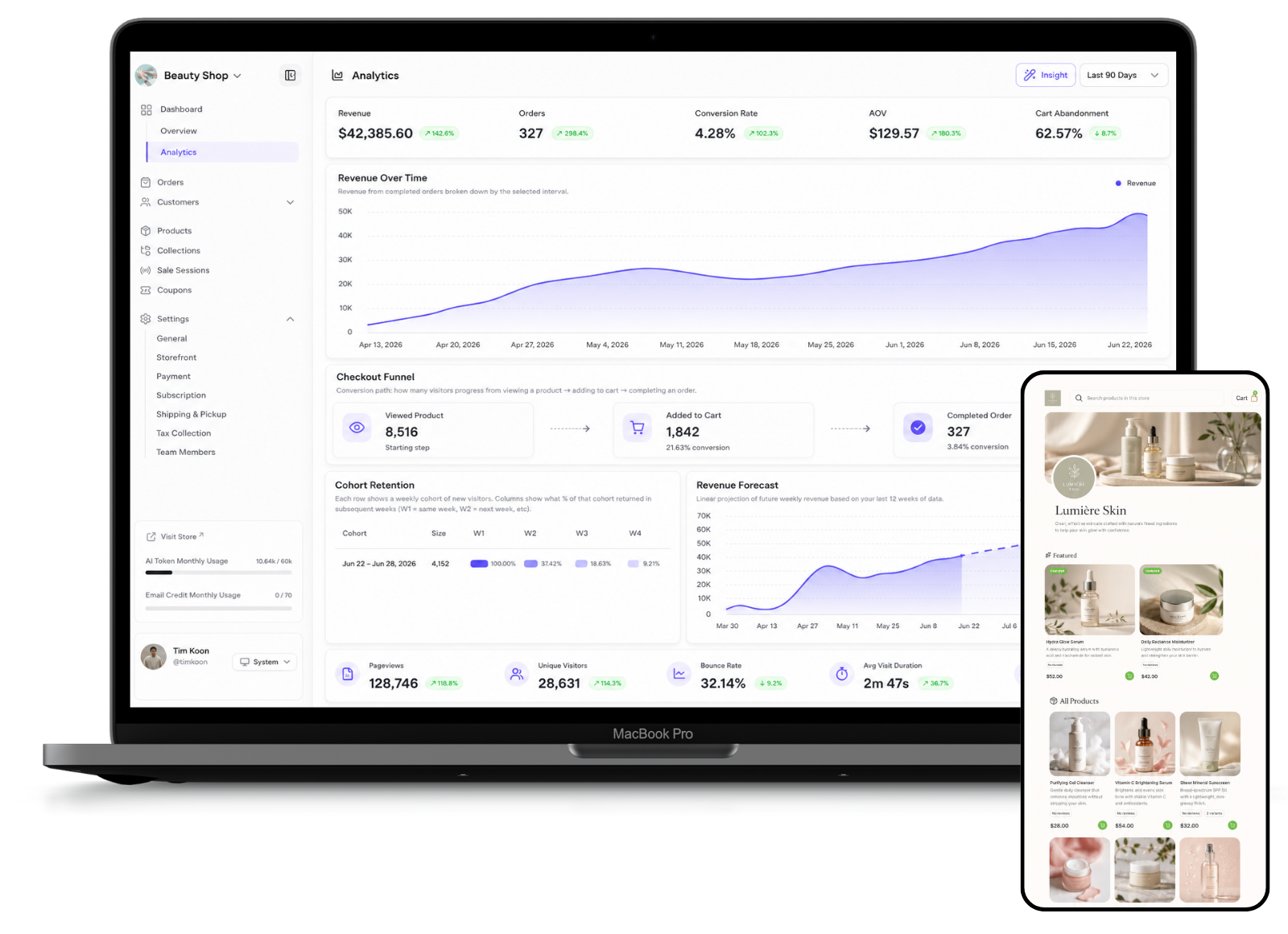
Dash to Cart’s analytics includes traffic reporting and a checkout funnel covering product views, add-to-cart activity and completed orders, which can help merchants identify where shoppers drop off.
How can I improve my ecommerce checkout conversion rate?
Start by identifying where customers abandon the purchasing journey.
Useful indicators include the number of people who view products, add products to their carts, begin checkout and complete their orders.
Then investigate possible friction: unclear shipping costs, unexpected charges, complicated checkout steps, limited payment options, poor mobile usability or insufficient product information.
Dash to Cart's analytics, for example, includes a checkout funnel covering product views, add-to-cart activity and completed orders so merchants can see how shoppers progress towards a purchase.
The goal isn't simply more traffic. It's helping more of the right traffic complete a purchase.
Why are people visiting my online store but not buying?
Traffic without sales usually indicates a problem somewhere between product interest and purchase confidence.
Possible reasons include unclear product information, weak pricing or value perception, unexpected shipping costs, limited payment methods, poor mobile experience, lack of trust or friction during checkout.
Start by looking at how visitors behave. If product views are high but add-to-cart activity is low, the product page or offer may need improvement. If carts are created but orders are not completed, checkout friction may be the bigger issue.
Dash to Cart’s current analytics includes product engagement, traffic metrics and a checkout funnel, allowing merchants to compare product views, cart additions and completed orders.
Payments
What payment methods should an ecommerce store in Singapore accept?
The appropriate payment methods depend on the customers you serve and where they are located.
An ecommerce business should generally consider card payments alongside relevant digital wallets and local payment options. Cross-border businesses may require additional methods depending on their target markets.
The objective is to provide trusted and convenient payment choices without making checkout unnecessarily complicated.
Dash to Cart connects merchant payments through Stripe and provides settings for supported payment options, including wallets and region-specific methods.
Can an ecommerce store accept local digital wallets in Singapore?
Yes, provided the ecommerce platform and payment provider support the relevant payment method.
Digital wallets can reduce checkout friction because customers may already have their payment credentials stored on their devices or accounts.
Dash to Cart's Stripe-connected payment settings include supported wallet and regional payment options. The current merchant interface includes options such as Apple Pay, Google Pay, GrabPay, NETS and PayNow, subject to the applicable payment configuration and availability.
Merchants should choose payment methods based on the markets and customers they actually serve rather than enabling every possible option.
How do I choose a payment gateway for my online store?
Look beyond the payment processing rate.
Consider:
- Security: How are transactions and payment information handled?
- Payment methods: Does it support the payment methods your customers prefer?
- Currencies and markets: Can it support the countries you intend to sell to?
- Integration: How easily does it work with your ecommerce platform?
- Payouts: How and when are funds transferred to your business?
- Fees: Understand transaction, currency-conversion and other applicable charges.
The right payment setup should make purchasing easy for customers while keeping payment administration manageable for the merchant.
What is the best payment gateway for an ecommerce business in Singapore?
The best payment gateway depends on your customers, sales markets, transaction volume and the payment methods you need to support.
When comparing options, look at transaction fees, settlement times, supported cards and wallets, fraud protection, international payment support, currency conversion and how easily the gateway integrates with your ecommerce platform.
For Singapore merchants, local payment preferences can also matter. Dash to Cart connects payments through Stripe and supports configurable payment methods including cards, digital wallets and selected regional options, depending on account and market availability.
The right choice is the gateway that gives customers a familiar, low-friction checkout while keeping payment administration straightforward for the business.
Analytics & Growth
What ecommerce analytics should an online store track?
Start with metrics that help you understand the path from visitor to customer.
Useful metrics include:
- Page and product views
- Unique visitors
- Traffic sources
- Add-to-cart activity
- Completed orders
- Revenue
- Conversion behaviour
- Bounce rate
- Average visit duration
- Product engagement
These metrics should not be viewed independently.
For example, high traffic combined with low add-to-cart activity may indicate a different problem from strong cart activity followed by poor checkout completion.
Dash to Cart Analytics includes revenue and traffic reporting, UTMs, product engagement and a checkout funnel covering product views, cart additions and completed orders.
What is an abandoned cart, and how can ecommerce businesses recover lost sales?
An abandoned cart occurs when a shopper adds products to their cart but leaves without completing the purchase.
Abandonment can happen for many reasons, including unexpected costs, distraction, payment friction, uncertainty or simply because the customer was not ready to buy.
Businesses can attempt to recover some of these opportunities by reminding customers about unfinished purchases, provided they have the right customer information and permissions.
Dash to Cart includes abandoned-cart recovery through its customer and promotional email tools.
Recovery is useful, but prevention matters too. A clear product experience, transparent costs and straightforward checkout can help reduce abandonment in the first place.
How do I track where my ecommerce traffic and sales come from?
Start by identifying the channels sending visitors to your store.
These might include Google, social media, advertisements, email campaigns, direct visits, referrals or other sources.
UTM parameters can also be added to campaign links to distinguish traffic from particular sources, mediums and campaigns.
Don't stop at counting visits. Compare traffic sources against product engagement, cart activity and orders to understand which channels are bringing commercially valuable visitors.
Dash to Cart's current analytics includes UTM medium and campaign reporting alongside other store traffic information.
How can AI help an ecommerce business?
AI can assist with repetitive or information-heavy ecommerce tasks, but its usefulness depends on how it is implemented.
Potential applications include helping merchants draft product descriptions, organise product information, generate marketing content and analyse store performance.
AI should support merchant decision-making rather than replace it. Product facts, prices, claims and customer communications still need appropriate human oversight.
Dash to Cart currently uses AI-assisted tools for areas including product descriptions, product imagery, promotional email writing and analytics insights.
About Dash to Cart
What is Dash to Cart and how does it work?
Dash to Cart is an ecommerce platform that combines independent merchant storefronts with a shared product Discovery experience.
Merchants create and manage their own storefronts, products, payments, orders, customers, promotions and analytics. Eligible products can also appear through Dash to Cart's central Discovery page, giving shoppers another way to find products and visit individual merchant storefronts.
When a shopper discovers a product and selects it, they are directed to that merchant's storefront rather than remaining on a conventional marketplace product page surrounded by competing listings.
Dash to Cart therefore combines two ideas:
An independent place to sell. A shared place to be discovered.
Is Dash to Cart a good alternative to Shopify or online marketplaces?
Dash to Cart takes a different approach from both traditional standalone ecommerce platforms and online marketplaces.
Standalone ecommerce platforms give merchants their own storefront, but merchants typically need to generate traffic through channels such as search, social media and advertising. Marketplaces provide shared product discovery, but sellers operate alongside other merchants and competing products.
Dash to Cart combines elements of both models. Merchants operate independent storefronts while eligible products can also appear on a central Discovery page, giving shoppers another way to find their products.
Whether Dash to Cart is the right alternative therefore depends on what a merchant needs. It is designed for businesses that want their own ecommerce storefront while participating in a shared product-discovery ecosystem.
How is Dash to Cart different from a traditional ecommerce platform or marketplace?
Traditional standalone ecommerce platforms primarily provide merchants with the infrastructure to create and operate their own stores. Merchants are generally responsible for attracting visitors through advertising, search, social media, and other marketing channels.
Marketplaces take a different approach. Products from many sellers exist within a shared shopping environment that already attracts buyers, but sellers operate within the marketplace's rules and alongside competing products.
Dash to Cart uses a hybrid model.
Each merchant operates an independent storefront, while participating products can also enter a shared Discovery environment designed to help shoppers find products across stores.
The Discovery system ranks products using signals including engagement, freshness, user interests and local relevance.
The idea is straightforward:
Discovery happens together. Selling happens in your store.
Can I migrate or import my products to Dash to Cart?
Yes. Dash to Cart provides product import functionality that supports Excel and CSV files, allowing merchants to bring product information into their store rather than adding every product individually.
Once imported, merchants can manage information including product descriptions, pricing, sale pricing, stock, SKUs, media, dimensions, variants and product tags from the product-management area.
For merchants considering another ecommerce platform, product migration is an important consideration because the amount of work required to rebuild a catalogue can influence the cost and effort of switching.
From idea to selling.
In just three steps.
- Create your store.
- Add your products.
- Connect Stripe. You’re ready to sell.